Haltech 8-Button CAN Keypad
Haltech 8-Button CAN Keypad
Haltech 8-Button CAN Keypad — 2 × 4
Part Number: HT-011501
The Haltech 8-Button CAN Keypad provides a compact, configurable driver interface for a compatible Haltech NEXUS or Elite system.
Each button appears in Haltech NSP as a CAN input and can be assigned to functions such as engine start/stop, cooling-fan override, fuel-pump override, traction-control enable, nitrous enable, data logging, air-conditioning request, launch functions, or other user-configurable controls. Buttons can operate momentarily or latch on and off, eliminating the need to dedicate separate ECU inputs to conventional switches.
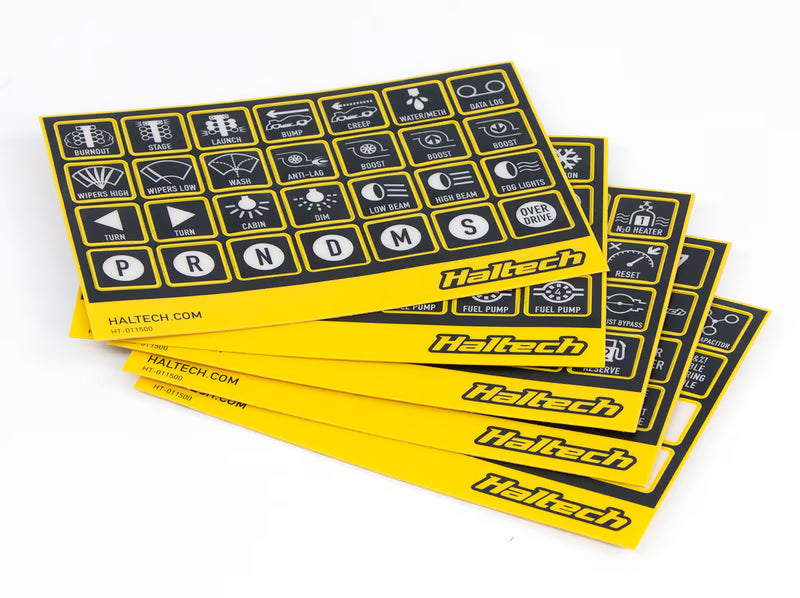
Three status LEDs above each button distinguish the button state, commanded function state, and system faults. The keypad includes adjustable backlighting, 140 semi-transparent function labels, CAN adapter cables, and panel-mounting hardware.
Key Features
- 8 programmable soft-touch buttons in a compact 2 × 4 layout
- Connects to compatible Haltech systems through the Haltech CAN network
- Compatible with NEXUS and Elite devices
- Each button functions as an additional configurable CAN input
- Momentary and push-on/push-off operating modes
- Configurable startup state for latched buttons:
- Off
- On
- Last state
- 3 status LEDs per button:
- Green button-state indicator
- Amber associated-function output indicator
- Red fault or DTC indicator
- Amber button backlighting
- Independently adjustable backlight and status-LED brightness
- Includes 140 semi-transparent button labels
- IP67 environmental sealing
- Vibration- and impact-resistant construction
- Short-circuit and reverse-polarity protection
- Rated for 1,000,000 operating cycles per button
- Compatible with Haltech Multi-master CAN architecture
Kit Includes
- HT-011501 — Haltech 8-button CAN keypad, 2 × 4
-
HT-011500 — Haltech CAN Keypad Label Set
- 5 label sheets
- 140 individual labels
- HT-130025 — DTM-4-to-DTM-4 CAN cable, 47.2 in. (1,200 mm)
- HT-130045 — DT-4-to-DTM-4 CAN adapter cable, 7.9 in. (200 mm)
- Mounting nut and washer set
- Quick Start Guide
Technical Specifications
- Button configuration:
- 8 buttons
- 2 rows × 4 columns
- Button operating modes:
- Momentary
- Push on/push off
- Button life:
- 1,000,000 cycles per key
- Operating-voltage range:
- 8–32 V DC
- Maximum operating current:
- 0.2 A
- CAN communication:
- Haltech CAN
- 1 Mbit/s
- Keypad connector:
- 4-pin Deutsch DT receptacle
- Environmental protection:
- IP67
- Rated for submersion to 3.3 ft. (1 m) for 30 minutes
- Ambient operating-temperature range:
- −40°F to 185°F (−40°C to 85°C)
- Backlight color:
- Amber
- Backlight brightness:
- Software configurable from 0–100%
- Status-LED colors:
- Green
- Amber
- Red
- Status-LED brightness:
- Software configurable from 0–100%
- Dimensions without connector:
- 4.15 × 2.50 × 0.61 in. (105.46 × 63.58 × 15.52 mm)
- Weight:
- Approximately 3.7 oz. (105 g)
- Configuration software:
- Haltech NSP
Button and Indicator Operation
-
Green LED
- Indicates the current state of the button.
-
Amber LED
- Indicates the output state of the function associated with the button.
- For example, a cooling-fan override button can show that the fan is operating even when it was activated automatically by coolant temperature rather than by the keypad.
-
Red LED
- Indicates a DTC or an error associated with the assigned function, input, or output.
-
Momentary mode
- The button remains active only while it is pressed.
-
Push-on/push-off mode
- The first press activates the button and the next press deactivates it.
-
Startup-state control
- A latched button can start in the Off state, On state, or its last state before shutdown.
Application Notes
- The keypad is compatible with Haltech NEXUS and Elite devices.
- It is not compatible with Haltech Platinum-series or earlier ECUs.
- The keypad connects to the Haltech CAN network using the included DT-4-to-DTM-4 adapter and 1,200 mm DTM-4 CAN cable.
- The keypad has one CAN connector and does not provide a second connection for daisy-chaining another device.
- A Haltech CAN hub or another CAN device with an available pass-through port may be required when the system already includes a dash, wideband controller, IO16, PD16, or other CAN accessories.
- Once connected, the keypad appears in NSP and must be enabled under the Haltech CAN System configuration.
- Each button is assigned as an input within the configuration of the function it will control.
- Typical keypad functions can include:
- Engine start/stop
- Cooling-fan override
- Fuel-pump override
- Air-conditioning request
- Traction-control enable
- Nitrous enable or override
- Data-logging start and stop
- Pit-lane speed limiter
- Launch-related functions
- Generic output overrides
- Generic condition controls
- Dash-page selection when assigned through a compatible Haltech dash
- Keypad buttons can be assigned to functions that accept a state-type CAN input.
- The keypad cannot replace a sensor or supply an analog measurement. Functions requiring a physical pressure, temperature, speed, brake, clutch, or other sensor signal still require the appropriate wired input.
- The keypad sends button commands over CAN; it does not directly switch fans, pumps, lights, solenoids, or other electrical loads.
- The commanded load must be operated by an appropriate ECU output, PD16 output, relay, or other power-control device.
- Button backlight and status-LED brightness are configured separately in NSP.
- With current Multi-master CAN firmware, individual buttons from the same keypad can be divided between a compatible Haltech ECU and an iC-7 or uC-10 dash.
- The same individual button cannot be assigned simultaneously to more than one master device.
- A conflicting button assignment generates a DTC and illuminates the button’s red error LED.
- Current Multi-master CAN functionality requires, at minimum:
- NEXUS ECU firmware 1.28.x
- Elite ECU firmware 3.12.x
- iC-7 or uC-10 firmware 2.28.x when a dash is used as a master
- NSP software 1.40.x
- All Haltech CAN keypads are compatible with the current Multi-master CAN update.
- In supported installations, the keypad can be controlled by a compatible Haltech dash without an ECU. The dash acts as the master device in that configuration.
- The included label set uses semi-transparent labels so the selected function icons remain visible with the keypad backlight illuminated.
- Installation requires a flat mounting surface and sufficient clearance behind the panel for the keypad connector and CAN adapter harness.
Haltech Usage Notice
Haltech products are designed and sold for sanctioned off-road, competition, and non-emissions-controlled applications. The purchaser and installer are responsible for confirming compliance with all applicable federal, state, and local emissions and vehicle-use regulations.
Couldn't load pickup availability