


Haltech 15-Button CAN Keypad — 3 × 5
Part Number: HT-011502
The Haltech 15-Button CAN Keypad provides a configurable driver interface for more complex Haltech NEXUS and Elite installations.
Each button appears in Haltech NSP as a CAN input and can be assigned to engine, drivetrain, power-distribution, or vehicle-control functions. Typical uses include engine start/stop, cooling-fan and fuel-pump overrides, traction-control settings, nitrous control, data logging, air-conditioning request, launch functions, lighting, and other programmable controls.
The larger 3 × 5 layout provides 15 controls in one compact panel, making it particularly useful with a Haltech PD16 or in vehicles where conventional switches, relays, and warning lamps are being consolidated into a programmable control system.
Key Features
- 15 programmable soft-touch buttons in a 3 × 5 layout
- Connects through the Haltech CAN network
- Compatible with Haltech NEXUS and Elite devices
- Each button functions as an additional configurable CAN input
- Momentary and push-on/push-off operating modes
- Configurable startup state for latched buttons:
- Off
- On
- Last state
- 3 status LEDs above each button:
- Green button-state indicator
- Amber associated-function output indicator
- Red fault or DTC indicator
- Amber button backlighting
- Independently adjustable backlight and status-LED brightness
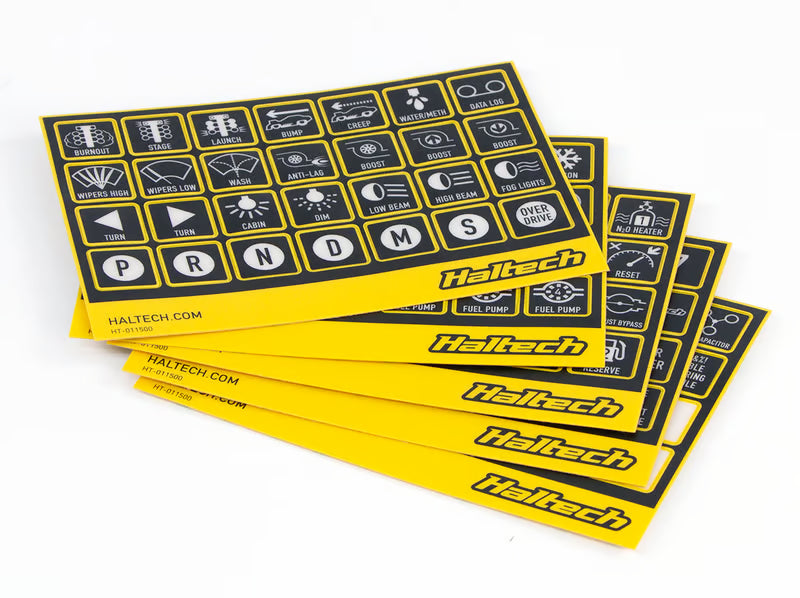
- Includes 140 semi-transparent function labels
- IP67 environmental sealing
- Vibration- and impact-resistant construction
- Short-circuit and reverse-polarity protection
- Rated for 1,000,000 operating cycles per button
- Compatible with Haltech Multi-master CAN architecture
Kit Includes
- HT-011502 — Haltech 15-button CAN keypad, 3 × 5
-
HT-011500 — Haltech CAN Keypad Label Set
- 5 label sheets
- 140 individual labels
- HT-130025 — DTM-4-to-DTM-4 CAN cable, 47.2 in. (1,200 mm)
- HT-130045 — DT-4-to-DTM-4 CAN adapter cable, 7.9 in. (200 mm)
- Mounting nut and washer set
- Quick Start Guide
Technical Specifications
- Button configuration:
- 15 buttons
- 3 rows × 5 columns
- Button operating modes:
- Momentary
- Push on/push off
- Button life:
- 1,000,000 cycles per button
- Operating-voltage range:
- 8–32 V DC
- Maximum operating current:
- 0.2 A
- CAN communication:
- Haltech CAN
- 1 Mbit/s
- Keypad connector:
- 4-pin Deutsch DT receptacle
- Environmental protection:
- IP67
- Rated for submersion to 3.3 ft. (1 m) for 30 minutes
- Ambient operating-temperature range:
- −40°F to 185°F (−40°C to 85°C)
- Backlight color:
- Amber
- Backlight brightness:
- Software configurable from 0–100%
- Status-LED colors:
- Green
- Amber
- Red
- Status-LED brightness:
- Software configurable from 0–100%
- Dimensions without connector:
- 5.13 × 3.58 × 0.62 in. (130.30 × 91.00 × 15.74 mm)
- Weight:
- Approximately 6.2 oz. (175 g)
- Configuration software:
- Haltech NSP
Button and Indicator Operation
-
Green LED
- Indicates the current state of the button.
-
Amber LED
- Indicates the output state of the function associated with the button.
- For example, a cooling-fan override button can show that the fan is operating even when the fan was activated automatically by coolant temperature rather than manually through the keypad.
-
Red LED
- Indicates a DTC or an error associated with the assigned function, input, or output.
-
Momentary mode
- The button remains active only while it is pressed.
-
Push-on/push-off mode
- The first press activates the button and the next press deactivates it.
-
Startup-state control
- A latched button can start in the Off state, On state, or its last state before shutdown.
Application Notes
- The keypad is compatible with Haltech NEXUS and Elite devices.
- It is not compatible with Haltech Platinum-series or earlier ECUs.
- The keypad connects to the Haltech CAN network using the included DT-4-to-DTM-4 adapter and 1,200 mm DTM-4 CAN cable.
- The keypad has one CAN connector and does not provide a second connection for daisy-chaining another device.
- A Haltech CAN hub or another CAN device with an available pass-through port may be required when the system already includes a dash, wideband controller, IO16, PD16, or other CAN accessories.
- Once connected, the keypad appears in NSP and must be enabled under the Haltech CAN System configuration.
- The correct 3 × 5 keypad option must be selected in the CAN-device configuration.
- Each button is assigned as an input within the configuration of the function it will control.
- Typical keypad functions can include:
- Engine start/stop
- Cooling-fan override
- Fuel-pump override
- Air-conditioning request
- Traction-control enable or adjustment
- Nitrous enable or override
- Data-logging start and stop
- Pit-lane speed limiter
- Launch-related functions
- Transbrake functions
- Generic output overrides
- Generic condition controls
- Lighting and accessory controls through a PD16
- Dash-page selection when assigned through a compatible Haltech dash
- Keypad buttons can be assigned to functions that accept a state-type CAN input.
- The keypad cannot replace a sensor or provide an analog measurement. Functions requiring a pressure, temperature, speed, brake, clutch, or other physical sensor signal still require the appropriate wired input.
- Haltech specifically identifies brake-switch, clutch-switch, and water-injection safety inputs as examples that cannot be replaced by keypad buttons.
- The keypad sends commands over CAN; it does not directly switch fans, pumps, lights, solenoids, starter motors, or other electrical loads.
- The commanded load must be operated by an appropriate ECU output, PD16 output, relay, or other power-control device.
- The larger 15-button keypad is particularly useful with the NEXUS PD16, where individual buttons can control vehicle circuits without requiring a separate physical switch and ECU input for each function.
- Button backlight and status-LED brightness are configured separately in NSP.
- When the keypad first establishes communication with the ECU, all LEDs flash briefly to confirm communication.
- The LEDs also flash when the backlight or status-LED brightness settings are changed.
- With current Multi-master CAN firmware, individual buttons from the same keypad can be divided between a compatible Haltech ECU and an iC-7 or uC-10 dash.
- For example, some buttons can operate ECU functions while other buttons control dash functions or PD16 circuits assigned through the dash.
- The same individual button cannot be assigned simultaneously to more than one master device.
- A conflicting button assignment generates a DTC and illuminates the affected button’s red error LED.
- With Multi-master CAN enabled, an unassigned button does not illuminate its status LEDs when pressed, although NSP can still display the button state.
- Current Multi-master CAN functionality requires, at minimum:
- NEXUS ECU firmware 1.28.x
- Elite ECU firmware 3.12.x
- iC-7 or uC-10 firmware 2.28.x when a dash is used as a master
- NSP software 1.40.x
- All current Haltech CAN keypads are compatible with Multi-master CAN.
- In supported installations, the keypad can be controlled by a compatible Haltech dash without an ECU. The dash acts as the master device in that arrangement.
- The included label set uses semi-transparent labels so the selected function icons remain visible with the keypad backlighting illuminated.
- The keypad requires a flat mounting surface.
- Installation should provide adequate clearance behind the panel for the keypad connector and CAN adapter harness.
- The 15-button keypad measures approximately 5.13 × 3.58 in. before allowing for the rear connector and wiring bend radius.
Haltech Usage Notice
Haltech products are designed and sold for sanctioned off-road, competition, and non-emissions-controlled applications. The purchaser and installer are responsible for confirming compliance with all applicable federal, state, and local emissions and vehicle-use regulations.